
Form element - textarea and CSS
Form element textarea is used for longer, multiline text, usually unlimited length. In intranet that element is used mostly for event comments, laboratory analysis notes etc. it means not structured data.
Example of live textarea elements completed by applied HTML and CSS code follows. Further you can find screenshots of that form in common browsers. By this way it is possible to compare rendering of element in actual version of browser with screenshots from other browsers. Examples are not full range tutorial of styling textarea element, but steps how get unified dimensions and how to remove border, so that element was usable in compact form.
|
| textarea {font: normal 13px Arial, SansSerif;} <textarea cols="7" rows="2"></textarea> | |
|
| .ta2, .ta3, .ta4 {width: 88px; height: 50px; margin: 0; padding: 0;} .ta2 {color: #a00; resize: none;} | |
|
| .ta3 {float: left; background: #ffa; border: 1px solid #00c; overflow: auto;} | |
|
| .ta4 {float: left; background: #ffa; border: 0; overflow-y: scroll;} |
On the left is sreenshot in Windows7, other examples are from Windows XP. Appearance of the elements depend on the Windows motive. It is possible to force IE into classic look style of form elements (IE menu: Tools / Internet Options / Edit / Enable display styles ...). Here you can find screenshots in older browsers.
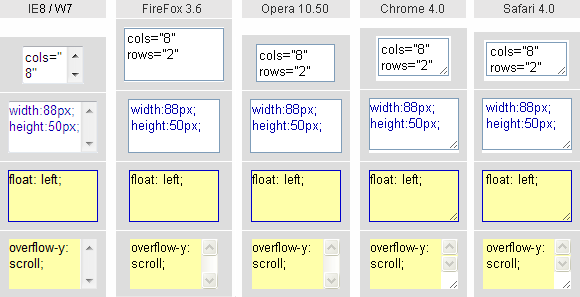
The first row of screenshots displays default look of textarea without any CSS style, only attributes are used for element sizing. Attribute cols adjusts the width and rows adjusts the height of element. Calculation is based on so called "average" character, but definition of average character is not clear. Therefore element size differs in every browser. It is plain, that attributes cols and rows do not fit for cross browser solution.
Default font for textarea is usualy monospace type. Therefore when other font type is required, then have to be declared for textarea element, or in class used for textarea element, or in universal selector *{}.
Firefox 3.6 does not display the prescribed font in textarea and input type="text" elements correctly. Bug appears as a variable amount of space between letters (letter-spacing / kerning). That bug can be corrected by setting CSS property font-size: 100% to the element textarea and input type="text" CSS declaration. Then the letter-spacing is normal.
Sizing of textarea by the help of CSS properties width and height unify the size somewhat better. Above and below element in IE6, IE7 remains empty space occupied by element. Other difference is due to the border width. Default border-width is 3 pixels in Webkit (for textarea), while other browsers allow 2 pixels. When the same dimensions in different browsers are required, the border-width has to be set explicitly. After that, W3C box model can be applied to textarea.
In the third row of screenshots is set border: 1px solid #00c;, empty space is removed by float: left; property and elment is switched to classic look by setting background property. Proportions and appearance is the same in tested browsers now. Vertical scroll bar turns up only when free space for text is utilized.
Scroll bar takes some space and therefore content of textarea is reformated after free space is used. This sudden reformatting is not always acceptable. Property overflow-y: scroll; attach persistent vertical scroll bar as shown in the last row of screenshots. Border of element is removed in the last row.
When part of web page is loaded dynamically, similar problem may happen in browser window. Vertical scroll bar of browser hides / displays and web page is repeatedly reformated. That occurs when the height of web is close to the height of browser window and dynamically loaded content change the height of web page. Then CSS property: body {overflow-y: scroll;} attaches permanent vertical scroll bar in browser to prevent web page reformatting. IE keeps scroll bar even for blank page, other browsers display scroll bar only when long page is rendered.
Atributes of element <textarea>
<textarea name="..." cols="50" rows="8" disabled>...</textarea>
name="..." attribute name is optional according to W3C specification, but when that attribute is not defined, element content is not submited on server for processing. Name should be unique identifier in form. name attribute is sometimes confused with optional attribute id="...", because it is good practice to use the same identifier for both attributes. Use attribute id only when reference to that element in JavaScript is required.
cols="50" rows="8" are required attributes according to W3C. If are left out, W3C page validator is angry. In practice these attributes are vain and do not warant nor similar element size across different browsers. For element sizing is more suitable to use cascade style sheets. When both attributes and CSS are used for ambition of valid page, CSS width and height overwrite attribute values.
Next optional attribute is disabled. Causes grayed text in IE and grayed background in all other browsers. Such an element is removed from the list of elements submited on server. In case of XHTML, correct code of that attribute is disabled="disabled".
Optional attribute readonly prevents editing element content, but content is submitted to the server. Status readonly is not indicated (except Safari, where it looks like disabled). Chrome, Safari and Opera do not allow to place text cursor into readonly textarea. IE and Firefox allow text cursor to be placed into readonly textArea and to move text cursor by cursor keys (that is confusing). When you press backspace key in IE, browser loads previous page (very confusing). Expected behavior of readonly textarea meets only Safari. In case of XHTML, correct code of that attribute is readonly="readonly".
Attribute maxlenght="1000" attribute is defined for the textarea in the HTML5 specification. Works in all modern browsers except for IE (including IE9). Usage is similar to the input type="text" element. Once the length of the typed text reaches the limit in maxlenght attribute, it is no longer possible to enter any other character. This state is not visually or otherwise indicated. Limit the length of the text inside the element in the browser IE is only possible by using JavaScript.
placeholder="any text". This attribute is part of HTML5 specification and is implemented in all modern browsers, except for IE. Empty element displays grayed text as placeholder attribute. When an element get focus, the placeholder text disappears.
There is no attribute value in form element textarea. Initial text in element is inclosed between opening and closing tags of this element. For working with content of element in JavaScript it is possible to use property value.
Comments on usage of element textarea
Entry of text in the form element textrea may be done in two modes. First mode is programmer's mode, or typewriter like style, when user breakes each line by Enter key. Second mode is text processing like, when line break is done by system and Enter key is used only for new paragraph.
Though the same text entered in either mode, distinguishes in count of "carriage return", displayed text e.g. in element <div> or <p> looks the same. That is due to HTML rules, carriage return is substituted by space character and text is reformated. When the programmer's mode input text format is to be preserved, then output text should be embedded in <pre> element.
Sometimes very long word (e.g. address link) need to be entered. When such a long text (without space or line break) is longer than the row width, that long word is broken on the border of letter, Opera retain long word not broken and displays horizontal scrollbar.
Here is one code tip for element textarea, which is sometimes wrong published. First code example adds opening and closing characters of carriage return to original text. Multiple edit and save the same record extend more and more carriage return characters.
<form >
...
<textarea name="wrong">
database text to edit
</textarea>

<textarea name="good">database text to edit</textarea>
...
</form>
The size of the element textarea in Chrome, Safari and FireFox4 user can adjust according to the needs. It is possible to drag the handle in lower right corner of element by mouse. Resizing can be disabled by using CSS property resize: none;. This option is used in the second textarea element of a live sample form above. If you need to permit resizing only in one direction, use the property value resize: vertical , or resize: horizontal.
This page is switched into the standard mode, so to sizing of element in browsers IE worked according to W3C box model. As far as you style forms, do not forget to declare correct doctype in HTML prologue.
updated 2011-03-26