
Form element - input type="file" and CSS
Form element input type="file" is used for uploading file to server. With help of screenshots and live form elements we prove that this element is practically not possible to style. In the second part of article some work experience with this element are mentioned.
You can find live form element input type="file" in the first row of examples, its look is determined by the current browser settings and OS theme. The following rows are screenshots of the same element in other browsers affected by the same style. Such a way allows comparing the look in your actual browser with the look in other browsers. On the left there is applied CSS code.
CSS:
input {
 font: normal
 13px Arial;
}

HTML:
<input type="file">
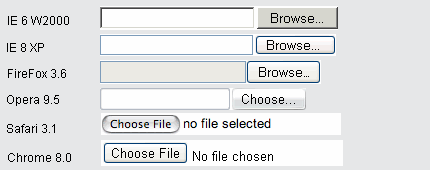
Above is default look of file element. Setting the width of element by the help of attribute size changes the total width of element, but variance of the width element in different browsers remain. The button heading depends on locale of browser and is not possible to change that text.
CSS:
.sizeXY {
 width: 320px;
 float: left;
}

HTML:
<input type="file"
 class="sizeXY">
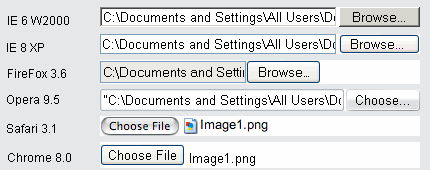
By font specification, IE adjust font setting in file path part, but font in button remains unchanged (probably Verdana). FireFox is fully irresponsive to font specification. Opera and Chrome sets font type in both parts of element correctly. Specified width is kept by all tested browsers, but FireFox fails to utilize entire width of element. Property float: left; removes needless 1px margin above and below element in IE, so as in case of other form elements in IE.
CSS:
.backgr {
 width: 320px;
 height: 20px;
 float: left;
 background: #ffa;
 text-align: right;
 border: 0;
}

HTML:
<input type="file"
 class="backgr">
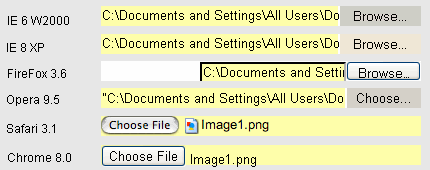
Now add some properties: background, which switches some form elements to classic look, try to remove border, set text align to the right and define the height of element. IE and Opera change look to classic and remove border not only in text part of element, but also in button. Property text-align: right; does not scroll text of file path to the right, but shifts complete element in FireFox. The height is adjusted in all browsers, but FireFox cut off bottom of text part of element and button in Chrome overflow the height size.
Form element input type="file" is combined element, consisting from two parts: text box and button. How to determine for which part of element is CSS code specified then? Each touch to apply some CSS property only worsen original appearance of element, therefore the style of this element is difficult to be modified.
Not only the look, but also functionality of the element file is different. In IE and Opera you have to click just the button to display the file selecting box (widget). Other browsers display that widget after clicking on any part of the element. IE, Firefox and Opera display (often very long) path to the file. IE and Firefox allow to traverse the path by help of arrow keys, but do not allow to edit the path. Chrome and Safari displays only the file name, without entire, unnecessary and rather confusing path to the file.
The only way how to build up this element according to your wish is based on the following principle: set up the element input type="file" complete transparent, thus becomes invisible, but basic functionality is preserved (click opens the dialog box). Above the transparent file element, normal (visible) textbox is positioned. The file name in textbox is set by javascript. The procedure is described in Quirksmode. A similar procedure can be found at Viget Labs.
There is no reason why the form element input type="file" should look like from the mid-90 years. Ideally, it could look as standard input type="text" with the same style options. Activating (clicking) that element calls a dialog box for file selecting. Attribute placeholder could replace the title on the button then.
Atributes of form element file
<form method="post" action="script.asp" enctype="multipart/form-data">
...
<input type="file" name="upFile" accept="image/*" multiple>
...
</form>
When file element is used, opening tag of form have to contain attribute enctype="multipart/form-data". Form element file can contain optional attribute accept, indicating acceptable file type according to MIME specifications. Only specified file types ought to be offered in dialog box. The code above ought to filter image file types. Attribute accept works in all modern browsers except of IE.
multiple attribute allows to pick up multiple files into single file element. In the dialog box for files selecting mark all intended files by pressing ctrl or shift key. Chrome browser displays the number of selected files, other browsers display list of files, including the path (separated by comma). Attribute multiple works in all modern browsers except of IE. On this page attribute multiple is used in the first live form example.
Practical using of element file
Uploading files to web server is not just a client-side code problem. Much more complicated is the server script code for processing the uploaded file. You need to design the directory structure, file naming convention, solve adding, deleting and overwriting files and update the links to that files. On a small intranet are often alternative methods of storing files on the server simpler.
Basic problem at file uploading are file names. To name document in unique and pregnant way, so that to be plain understandable for all intranet users is almost impossible. Next problem, hidden in uploaded file names, is using national alphabets and accented characters in file name. Such a way named files in multi-national environment, sometimes causes, that it is not possible to download and open file to PC with another national system than original one.
Advantage of uploading file is in case of frequent updating one file with the same data type, and when real data are often changed. That file is given fixed name on server, and file content text description is attached. Uploaded file is renamed to that given fixed name and by that original file is overwritten. By this way menu in Canteen, or daily work specification in Tool Shop application is updated. Description of this applications you can find in section intranet applications Tour.
Another time it is preferable to assign web subdirectory as network drive for certain user and allow him to save, delete or overwrite files in this directory. It is important is to keep file names according to negotiated convention. By file name conventions, application can find, if file exists and offer this file for download. Other users of intranet can open this file from their browser. Such method is used in application Contracts, which inspect terms of contract expiration, progress of contract signing as well as contains .pdf copy each contract.
Other files or documents type of ISO, directions, templates, forms are saved on server by intranet manager and always are completed by accompanying text, which in a few words describes file content. At the same time it is possible to unify order of documents, to group them, replace old ones and alike. Commented list of documents is more cheerful than any search tool.
If you want to establish intranet, based on uploaded files, take into account the problems described above. Remember, that ability to name well and concisely file is indirectly proportional to ones position in company.
updated 10.12.2010