
Form elements and box model
Box model determines calculation rules to size HTML elements on the basis of CSS properties. There are no obligatory rules for sizing of form elements according to CSS properties, general recommendation is to use historic attributes size, rows and cols. Results of this way "unified" form elements size you can find in articles textBox and textarea. In this article I discover how different browsers are able to keep optional box model at form elements.
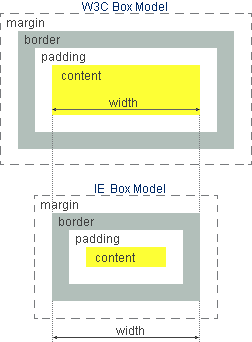
There are two box models. Standard browsers use W3C box model, Internet Explorer uses traditional box model. IE6 and above can be switched to the standard mode by the help of preamble declaration DOCTYPE and this way ensure standard box model in all common browsers.
W3C consider CSS width as the most inner element width, to which values of padding, border and margin are added from both sides. Total sum of all these values result in outer width, which element occupies. The same method is used for calculation of outer height of element.
In traditional box model, which is used by Internet Explorer, CSS value width sets visible width of element including border and inner indent padding. Then element occupies total size (width + 2*margin) x (height + 2*margin).
When working with pictures (img) W3C box model is more intuitive, next time, at work with tables or forms, traditional model seems to be more intuitive. It does not matter according to which box model proportions are calculated, important is that used model is uniform across all browsers. Besides, CSS property box-sizing will enable to select suitable box model according to the needs.
Live form example follows. Elements are formatted for the need of box model explanation. Look of element depends on your actual browser, but the width of elements should be the same. On the right side is CSS code used for element formatting. Elements background is gray, to make visible white parts of elements.
Screenshot of form comes from IE7, Win XP, motive classic and is zoomed to 200%. Inner indent padding for elements textbox and textarea are colored in graphic editor as light blue, to be clearly marked. border of elements are retained as default, what means 2 pixels width in all tested browsers. Outer indent margin is set-up for all elements to 4 pixels.
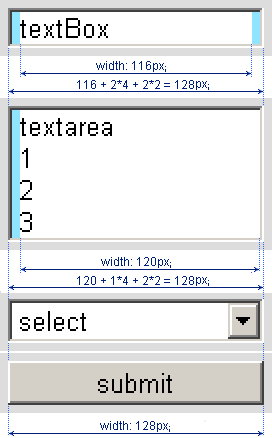
According to form elements in relation to box model we can specify two groups of element types.
1. Form elements which follow the instructions of W3C box model: form, input type="text", input type="file" and textarea.
2. Form elements which follow traditional box model: input type="submit" (include type reset and button) and select. These elements are rendered everywhere and always according to traditional box model. Elements checkbox and radio button can also be placed into this group. Usually they are displayed as a bitmap icon (some zoomed) and no box model can be applied. The only one browser, up to now, which is able to render these elements with CSS utilization (not as icons) is Opera. Then they perfect fit to traditional box model.
To set-up the visual width (without margin) of elements from the first group,
use following calculation:
visual width = CSS width + 2*padding + 2*border
Textarea has set-up only left side padding because right side padding causes shift of vertical scroll bar in some browsers. Therefore only one padding value is used in calculation.
To set the required visual width for elements in the second group (select and buttons) is very simple. Set-up required width only. Other CSS properties like border and padding have no meaning for setting the width for this type of form elements. I remind that these elements are rendered according to traditional model in standard browsers as well as in IE switched to the standard mode.
Determination of the height of form elements is the same principle. But it is necessary to take into account the height of the font used, so that the height of element and used font fit together. For setting the font of form elements, use universal selector *{} or, list all the form elements in the CSS declaration.
Calculation is valid only when pixels are used as unit. When other units are used (e.g. percent) results are not predictable especiatly in case of IE.
textarea element is in Chrome and Safari rendered by 2 pixels smaller than the CSS prescription. This is due to the fact that WebKit calculate the default width of the border 3 pixels, the other browsers allow 2 pixels. If you explicitly set the width of the border e.g. textarea {border: 2px inset lightgray;} then dimmensions perfect match. When you set textarea size by using of CSS and you need a valid page by W3C, and add some attributes cols and rows.
Box model compliance is not completely perfect. For example textarea in Safari and Chrome is 2 pixels smaller. Height of elements select and submit in Safari depend upon used font size. In our case the height of elements is lower than specified. Font larger than proportions of element causes text cut off. According to W3C in textarea are required attributes cols and rows. Element without these attributes is not valid, even if final size is build according to CSS properties, not according to attributes.
Internet Explorer have to be switched to the standard (strict) mode. Only then IE6+ applies standard box model to all HTML elements in a page. Switch is done on first line of HTML code by introduction one of following definitions. The first definition is for XHTML code, the second is for HTML code and the third, simple code, is for standard mode according to HTML5 specification.
<!DOCTYPE html PUBLIC "-//W3C//DTD XHTML 1.0 Strict//EN"
 "http://www.w3.org/TR/xhtml/DTD/xhtml1-strict.dtd">

<!DOCTYPE HTML PUBLIC "-//W3C//DTD HTML 4.01//EN"
 "http://www.w3.org/TR/html4/strict.dtd">

<!DOCTYPE html>
updated 06.01.2011