
Form elements - submit, button and CSS
Submit form button can be created by several ways. Except element <input type="submit" />, it is possible to use graphic button <input type="image" />, or element <button>. Animation is provided for submit and button (image is not supported). Style of animation differs according to type of browser and according to type of element. Somewhere only frame is changed as animation, elsewhere also inner content of button is shifted. Safari changes color of entire buttons.
Live form with styled submit button follows. Each button is completed by used code. Submit buttons here are only examples of styling button type submit, not full-range collection of all possibilities.
|
| <input type="submit" value="submit"> | |
|
| <input type="submit" value="submit" disabled> | |
|
| .size92x22 {width: 92px; height: 22px;} | |
|
| .background {width: 92px; height: 22px; background: #ffa; color: #00f;} | |
|
| <button> ... </button> |
Live form in your browser does not have to confirm screenshots. Elements rendering depends on local browser setting, browser version or motive in OS. Browsers IE allows to change display of form elements (Tools/Internet Options/Advanced/Enable visual styles on buttons...). IE 6, 7, 8beta buttons depends on motive (XP / classic) only. FireFox screenshot comes from Windows in motive classic and the look is the same as Chrome beta browser. HTML code have to switch IE browser into standard mode.
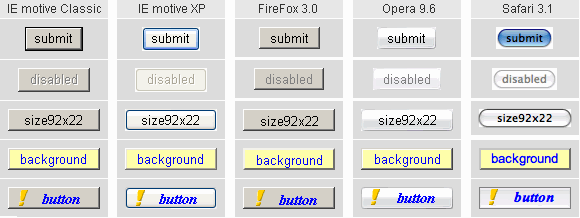
In the first row of screenshot is default look of element without any CSS class or attribute. Size and look of element submit depend upon browser type. When attribute value contains very long text, rounded corners in XP become biased. Expilcit set-up of property width corrects rendering. For Safari button in active state is displayed. Default height of submit button in IE is 2 pixels higher compared with browsers display.
When attribute disabled is set-up, text in button changes to grey as notice, that element status is inactive. This attribute can be set by submit script and by that way report, that form is already submitted as well as status disabled prevents next submitting. More in article form submit. When color property is set-up in CSS class for element submit (color is not inherited), then change the color text to grey is implemented only in browsers IE7 and Opera, other browsers let pre-set color in CSS style property and status disabled is not quite recognizable.
Setting dimensions of button by help of CSS properties do not make problem in any browser. When pixel precision is not required, then attribute size is good solution for button size setting. Attribute size indicates "average characters" count. By this way specified width differs by browsers (in pixels).
When unified crossbrowser shape of submit button is required, property background switchover the look of button to classic type, similar in Win2000. Result is not identical buttons in different browsers, but they look quite similar.
Last row of screenshots is created by help of element button. This type of element can contain both text and image (icon). Unfortunately incorrect processing of element button at form submitting in IE restricts practical use to form with one submit button, ergo when server script do not test name of submit element.
Atributes of element submit
<input type="submit" name="inpSubm" value="save to database" />
Part of form data set posted to server is also substring name=value of element submit, but only in case when form was sended by help of that button. According to above declaration of element submit it would be substring inpSubm=save to the database. This is helpful when form use more submit buttons and each button has to invoke another action on server. Then each button has unique text in value.
When attribute value is not used, browsers Safari and Opera use English original word Submit. Browsers IE and FireFox use localised word according to national environment.
Element <button> .... </button>
Using element button is inviting and together hard to use. Because of pair character of element, inviting is to insert other HTML elements inside of the button. In practice usable are pictures, icons and formatted text. It is impossible to insert elements <button>, <select>, <input>, <a>. It is hard to use because of IE, which cannot post correct form data of this element (pair name=value). Basic attribute type determines behavior of element button and can be one of following values:
- type="submit"
Default value for FireFox, Opera and Safari. Mouse click evokes form submitting and well filled in substring name=value of button by which form was submitted is appended. Browser IE posts content of element (e.g. entire image tag), not its value. If there are more elements button type="submit" in form, IE submits data (complete content) of all buttons to server and so it is not possible to determine by which button submitting was initiated. - type="button"
Default value (when attribute type is skiped) in IE. Mouse click do not invokes form submit in none of tested browsers. It is supposed to use as independent button for calling client scripts, e.g. JavaScript calculator, or menu of application. Form submit is possible only by help of JavaScript. Script can resolve bugged element processing in IE and can provide form validation. Without switched on JavaScript it is impossible to submit such a form. - type="reset"
Form resetting is not used in these days, therefore this type is quite insignificant.
Element button in browsers FireFox and Chrome do not visualy differentiate status disalbed. Example of CSS and HTML code for element button according to which screenshots and functional button in live form above was created follows:
CSS:
.btn {color: #00f; font: italic bold 15px Times New Roman;
      width: 80px; height: 22px; padding: 0 8px;}
.ico {width: 10px; height: 16px; border: 0; float: left;}

HTML:
<button type="button" name="subm" value="save" class="btn">
<img src="../files/iconExclam.png" class="ico" />
Button
</button>
One remark about using style property float: left; for image. When inside of element are used both image and text, image alignment is performed to typographic lines of text and then property vertical-align does not help to much. Floating image is removed from bindings to typographic lines and can better exploit height of button. The same applies when picture and text is inserted into one table cell. HTML formatting inside of button is far from simple. Sometimes it is necessary to write entire code in one line, leave out auxiliary div, span, or define explicit width of button.
updated 22.10.2008