
Form element - select and CSS
Form element <select> is used for selection one (or more) choices from predefined number of options. In case of intranet select is used for selection from database codebooks (production lines, machines). Using CSS for styling of this element is presented in this article.
Live select elements completed by applied HTML and CSS code follows. Further you can find screenshots of that example in common browsers. By this way it is possible to compare rendering of element in your actual browser with screenshots from other browsers.
|
| select {font: normal 13px Arial, SansSerif;} <select> ... </select> | |
|
| .se1 {width: 92px; height: 22px;}
<select class="se1" disabled> ... </select> | |
|
| .se2 {width: 92px; height: 22px; color: #c00; border: 1px solid #c00;} <select class="se2"> ... </select> | |
|
| .se3 {width: 92px; height: 22px; background: #ffa;} <select class="se3"> ... </select> | |
|
| .se4 {width: 92px; height: 18px; border: 0;}
<select class="se4"> ... </select> | |
|
| .se5 {width: 92px; height: 80px; margin: 0;}
<select size="5" class="se5"> ... </select> | |
|
| .se6 {width: 92px; height: 22px;}
<select size="4" class="se6"> ... </select> |
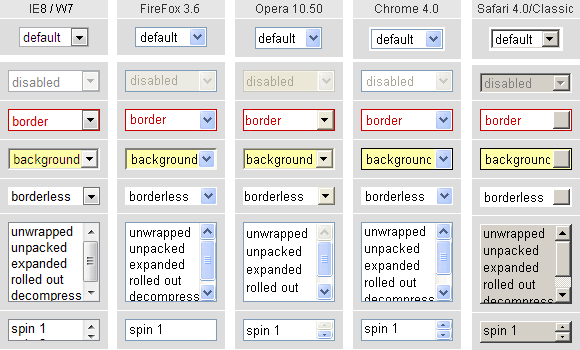
On the left is sreenshot from Windows7, other examples comes from Windows XP. Safari captures some rendering bugs in the classic motive. In the XP motive, Safari looks nearly identical to that in Chrome. Screenshots of form elements from older browsers can be found here.
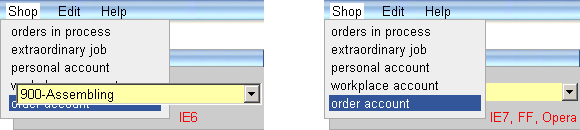
IE6 cannot change the border of select element and every time element flows up on top of other elements in web page. IE7 already can work with z-index and allow correct overlapping, but continue to inability change the border. IE8 finaly can render select element as expected.
The first row of screenshots shows the select element without use of cascading style sheets. The width is determined by the longest text in the elements option, the height is determined by used font. Font used in element have to be declared separately for the element or for class used in the element. Arround select in browsers Chrome and Safari is some empty space.
Now element size is set by the help of CSS properties to width: 92px; height: 22px; and at the same time status disabled is set up by attribute. Element select emulates traditional box model, rather then standard W3C box model. Therefore specified size is applied to outside dimensions, values of border and padding are not applied. More in article form box model.
In the third row of screenshots is set-up red text and red border width of 1 pixel. You can see that browser IE8 finally is able to style the border of element select. Some difference, not visible in screenshots, is the width of drop-down list of options. In standard browsers the width of list follows the longest option to make readable all items. In IE the width of list takes over the widht of select element and hides overflowed part of text in options.
Unwritten rule at form element rendering is possibility to switch to the classic look by the help of CSS style background. Result is displayed in "yellow" row.
Now, border of element is removed by the help of CSS property border: 0;. When you really need to remove select border in IE6 and IE7, try to use method described in article select experiment.
Permanent visible option list
Current look of select element display only one selected option. When more, all the time, visible options are required, then attribute size can be used. Such an "open" select element is effective also when multiple selection is enabled. CSS properties width and height can be specified also to get cross browser dimensions (except IE7 and IE6).
The last row of screenshots show interesting combination of select element with size attribute and CSS height property set to the height of one line. By that way some browsers create element similar to spin control. It is possible to select desired option with help of cursor keys.
Other subject, not described here, are elements option and optiongroup and related CSS properties. You can visit live example of styling elements select and nested elements option and optiongroup.
Atributes of element select
<select name="..." size="5" multiple="multiple" >
<option value="1" selected="selected">PICK 1</option>
...
</select>
name="..." Name is optional attribute, but omitting causes that element content is not submitted to server. When used, name value should be implemented as unique identifier.
size="5" By using attribute size permanently visible drop-down list of options is created. Value designates how much rows are visible. Default value is size="1", what means dynamically opened element.
multiple attribute multiple enable to select more options in one element select by help of keys Ctrl, or Shift and mouse click. Likewise files are selected in Windows Explorer. Additional effect of multiple attribute is permanent visible options list. Posibility of multiple selection is not indicated in any visible way, therefore that should be explained in supporting text.
value="1" atribute value in element option indicates the value, which is going to be sent to server in case this item is selected. Submitted data are in pattern select name=option value. Value content can be text, or number.
selected atribute selected in element option indicates default selected item. When edit existing database record, use this attribute to specify original, saved option. It is possible to change selected option, but there is no way to deselect all options.
Syntax of attributes multiple and selected mentioned above are for HTML code. Standard XHTML code requires declaration: multiple="multiple", or selected="selected".
Select element and overlapping
Following screenshot indicates defective behavior of select element in IE6 browser. Application menu is to be on top of page, above the form. In IE6 part of application menu is unreadable due to floating up of select element. This laps occurs only in browser IE6. In that case does not help to set z-index, select element in IE6 and older always "floats up", no matter what do you do.
updated 2023-10-31